TL;DR

Get cleaning gear delivered free with Prime
- Fast, free delivery on millions of items
- Prime Video, Amazon Music and more included
- Member-only deals all year
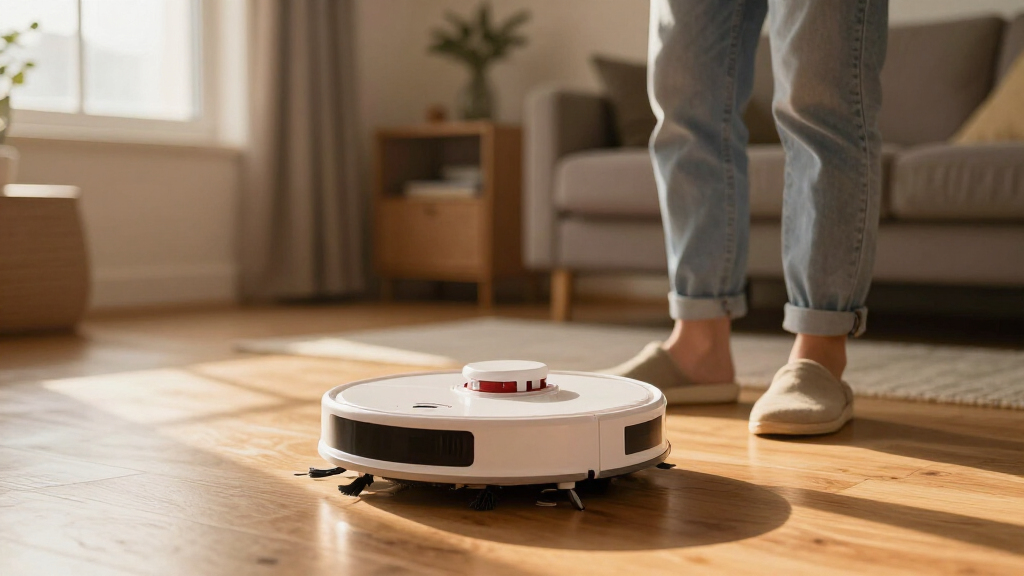
Regularly clean brushes, replace filters every 1-3 months, and care for the battery to dramatically extend your robot vacuum’s life. Small, consistent actions prevent costly repairs and performance drops.
Clean brushes and sensors weekly to keep suction and navigation sharp.
Replace filters every 1-3 months to maintain air quality and performance.
Care for the battery by avoiding full depletion and overcharging, extending lifespan.
Update firmware regularly to fix bugs and improve cleaning efficiency.
Routine inspections of parts prevent breakdowns and costly repairs.
Clean the Brushes and Sensors Weekly for Peak Performance
The first step to maintaining your robot vacuum is keeping the brushes and sensors free of hair, dust, and debris. Think of your vacuum’s brushes like the wheels on a bike — if they’re clogged or tangled, everything slows down.
Pull out hair, string, and dust bunnies from the brushes using scissors or a small brush. Wipe sensors with a soft cloth to keep navigation sharp. For example, a pet owner might find hair tangling on the brushes every week, reducing suction and cleaning efficiency.
Skipping this step leads to longer cleaning cycles and more battery drain. Regular cleaning takes just 5 minutes but saves hours of frustration.
Deep cleaning the brushes and sensors is crucial because tangled hair and dust act like a weight or obstacle, reducing the vacuum’s ability to move effectively. When sensors are dirty, the vacuum’s navigation algorithms can get confused, causing it to miss spots or bump into furniture repeatedly. This not only diminishes cleaning quality but also puts extra strain on motors and batteries, increasing wear and tear over time. Investing a few minutes weekly ensures the device operates at peak efficiency, conserving energy and extending its operational lifespan.
As an affiliate, we earn on qualifying purchases.
Replace or Clean Filters Every 1-3 Months
Filters are the lungs of your robot vacuum. They trap dust, allergens, and pet dander, and need regular attention to keep suction high. If filters are clogged or dirty, your vacuum has to work harder to achieve the same cleaning results, which can strain the motor and battery over time.
Replacing filters on schedule ensures the vacuum maintains optimal suction power, which directly impacts cleaning effectiveness. Washable filters, if available, should be rinsed thoroughly and dried completely before reuse to prevent mold or damage. Neglecting filter maintenance can lead to decreased air quality, reduced suction, and increased energy consumption, all of which shorten your device’s lifespan. Regularly checking and replacing filters is a small investment that yields significant long-term benefits in performance and durability.
Beyond simple maintenance, understanding why filters matter helps you appreciate their role. Filters prevent fine dust and allergens from recirculating into the air, which is vital for households with allergies or asthma. When filters are clogged, the vacuum’s motor compensates by working harder, which accelerates wear and reduces overall lifespan. Choosing high-quality, compatible filters and adhering to replacement schedules balances cleaning performance with device longevity, ensuring your vacuum remains effective without unnecessary strain on its components.
replacement filters for robot vacuum
As an affiliate, we earn on qualifying purchases.
As an affiliate, we earn on qualifying purchases.
Care for the Battery to Keep Power Stable
The battery is the heartbeat of your robot vacuum. Proper charging habits not only extend its lifespan but also keep cleaning times consistent. When batteries are treated poorly — for example, being fully drained frequently or overcharged — their capacity diminishes faster, leading to shorter run times and the need for costly replacements.
Charging habits matter because lithium-ion batteries prefer partial charges and frequent top-ups over full discharges. If you regularly let the battery run to zero, it stresses the cells and accelerates degradation. Conversely, overcharging or leaving the device plugged in constantly can cause overheating and reduce overall capacity. Maintaining a balanced approach—like charging when the battery hits around 50-60% and unplugging at full charge—helps preserve battery health. Proper care can extend the battery’s effective lifespan from 2 to 4 years, saving money and ensuring reliable cleaning power. Using the original charger prevents voltage and current inconsistencies that can damage the battery or reduce its capacity over time.
Understanding the implications of poor battery care is essential because a degraded battery not only shortens operational time but can also cause the vacuum to shut down unexpectedly mid-clean, leading to incomplete cleaning cycles and increased frustration. Over time, neglecting battery maintenance can result in a costly replacement and even damage internal components if the battery swells or leaks. By adopting simple habits—like avoiding full discharges, not overcharging, and storing the vacuum in a cool, dry place—you ensure your device remains reliable and cost-effective for years to come.
As an affiliate, we earn on qualifying purchases.
Update Firmware and Software for Better Performance
Keeping your robot vacuum’s software current isn’t just about new features; it’s a critical step in maintaining reliable operation. Manufacturers release updates that fix bugs, patch security vulnerabilities, and optimize navigation algorithms. Outdated firmware can cause your device to get stuck, miss spots, or operate inefficiently, which can lead to increased wear and tear.
Regularly checking for updates ensures your vacuum benefits from improvements that enhance cleaning quality and reduce the risk of malfunctions. For example, a firmware update might improve obstacle detection, preventing the vacuum from repeatedly bumping into furniture or getting stuck. This reduces the need for manual intervention, saving you time and preventing unnecessary stress on parts. Updates are typically easy to install—often just a few taps in the app—and are a simple, cost-effective way to extend your device’s lifespan by maintaining optimal performance.
Beyond convenience, firmware updates often include critical security patches that protect your device from vulnerabilities. Outdated software can be exploited or may cause compatibility issues with other smart home devices, leading to operational glitches. Staying current with updates ensures your vacuum operates smoothly, securely, and efficiently, ultimately prolonging its functional life and reducing maintenance costs.
robot vacuum firmware update device
As an affiliate, we earn on qualifying purchases.
As an affiliate, we earn on qualifying purchases.
Store and Use Your Vacuum Properly to Avoid Damage
Where and how you store your vacuum can significantly impact its longevity. Exposure to humidity, direct sunlight, or extreme temperatures accelerates material degradation and can damage internal components. During use, environmental hazards like cords, loose rugs, or small objects can cause the vacuum to get stuck or damage wheels and brushes. For example, high-pile rugs or cluttered floors increase the risk of motor strain or mechanical failure.
Maintaining a clean, organized environment reduces operational stress and prevents accidental damage. Proper storage in a dry, cool place helps preserve batteries and plastic components. Moreover, consistent use—without overdoing it—ensures the device remains in good working order, avoiding overheating or unnecessary wear from overuse. Regularly inspecting the area before cleaning and tidying up obstacles ensures smoother operation and extends the life of delicate parts.
Choosing an appropriate storage spot—like a closet or corner away from direct sunlight—protects the device’s exterior and internal electronics. Additionally, using the vacuum regularly but not excessively prevents components from overheating or wearing prematurely. Taking a few moments to clear the floor of potential obstructions and storing the device in a stable, climate-controlled environment significantly reduces the risk of environmental damage, keeping your investment safe and functional over the years.
Routine Inspections and Part Replacements Save Money
Regularly inspecting your vacuum’s components like wheels, brushes, and filters allows you to catch wear and damage early. Worn or damaged parts can lead to decreased suction, uneven cleaning, or motor strain, which in turn increases the risk of more costly repairs or replacements down the line. For example, a worn brush can cause hair or debris to get tangled more easily, putting extra stress on the motor.
Replacing parts at the first sign of wear—such as a $10 brush—can prevent larger issues, saving you money and extending the device’s functional life. Many models have design features that make parts easy to access and swap, encouraging routine maintenance. By proactively maintaining these components, you ensure your vacuum operates efficiently, maintains suction, and avoids breakdowns, ultimately saving you money and time in the long run.
Moreover, routine inspections help you identify potential issues before they escalate. For instance, inspecting wheels for cracks or debris prevents motor overloads or mechanical failures. This proactive approach minimizes unexpected downtime and costly repairs, preserving your device’s value and performance over its lifespan. Regular maintenance also helps you develop a better understanding of your vacuum’s condition, allowing for more accurate budgeting and planning for replacements or upgrades when necessary.
Compare Different Maintenance Tasks and Their Impact
| Task | Frequency | Impact |
|---|---|---|
| Clean brushes | Weekly | Prevents tangling, maintains suction, reduces motor strain, and ensures consistent cleaning performance. Regular cleaning prevents hair and debris from accumulating, which can cause motors to work harder, generate excess heat, and wear out faster. Neglecting this can lead to a cycle of declining performance and costly repairs. |
| Replace filters | 1-3 months | Maintains air quality, prevents loss of suction, and reduces strain on the motor, prolonging the device’s lifespan. Dirty filters restrict airflow, forcing the vacuum to exert more effort, which accelerates component wear and reduces overall lifespan. Timely replacement ensures optimal airflow and energy efficiency. |
| Update firmware | Every few months | Fixes bugs, improves navigation, and helps prevent operational glitches that can cause damage or reduce efficiency. Keeping firmware current minimizes the risk of software-related malfunctions that could lead to mechanical stress or damage, thereby extending the device’s functional life. |
| Check batteries | Every 6-12 months | Ensures consistent power output, prevents capacity loss, and extends overall battery life, avoiding unexpected failures during cleaning. Regular checks can reveal early signs of degradation, allowing timely replacement or maintenance to prevent sudden shutdowns and maintain cleaning performance. |
Frequently Asked Questions
How often should I clean the brushes and sensors?
Ideally, clean the brushes and wipe sensors once a week. If you have pets or allergies, do it more often to prevent hair buildup and maintain optimal performance.When should I replace my robot vacuum’s filter?
Most filters should be replaced every 1 to 3 months. Check your user manual for specific recommendations, but if suction drops or you notice reduced cleaning quality, it’s time for a new filter.How can I tell if my battery is failing?
If your vacuum’s runtime shortens significantly or it struggles to charge fully, the battery may be degrading. Replacing the battery after 2-4 years can restore performance.Is it safe to use cleaning products on my robot vacuum?
Stick to manufacturer-recommended cleaning methods. Harsh chemicals can damage plastic and sensors. Usually, a soft cloth with water or mild soap suffices.What’s the best way to prevent my vacuum from getting stuck or damaged?
Clear the floor of cords, small objects, and high-pile rugs. Regularly update the firmware and keep sensors clean to help the vacuum navigate smoothly.Conclusion
A little attention goes a long way. Regular cleaning, smart battery habits, and timely updates keep your robot vacuum humming for years, saving you money and hassle. Think of it as giving your device a health check — simple, quick, and worth every minute.Halloween Picks
halloween
As an affiliate, we earn on qualifying purchases.